Data Extraction Agent
Active Agent provides data extraction capabilities to parse structured data from unstructured text, images, or PDFs.
Setup
Generate a data extraction agent:
rails generate active_agent:agent data_extraction parse_contentAgent Implementation
class DataExtractionAgent < ApplicationAgent
  before_action :set_multimodal_content, only: [ :parse_content ]

  def parse_content
    prompt(
      message: params[:message] || "Parse the content of the file or image",
      image_data: @image_data,
      file_data: @file_data,
      output_schema: params[:output_schema]
      )
  end

  def describe_cat_image
    prompt(
      message: "Describe the cat in the image",
      image_data: CatImageService.fetch_base64_image
      )
  end

  private
  def set_multimodal_content
    if params[:file_path].present?
      @file_data ||= "data:application/pdf;base64,#{Base64.encode64(File.read(params[:file_path]))}"
    elsif params[:image_path].present?
      @image_data ||= "data:image/jpeg;base64,#{Base64.encode64(File.read(params[:image_path]))}"
    end
  end
end{
"format": {
"type": "json_schema",
"name": "chart_schema",
"schema": {
"type": "object",
"properties": {
"title": {
"type": "string",
"description": "The title of the chart."
},
"data_points": {
"type": "array",
"items": {
"$ref": "#/$defs/data_point"
}
}
},
"required": ["title", "data_points"],
"additionalProperties": false,
"$defs": {
"data_point": {
"type": "object",
"properties": {
"label": {
"type": "string",
"description": "The label for the data point."
},
"value": {
"type": "number",
"description": "The value of the data point."
}
},
"required": ["label", "value"],
"additionalProperties": false
}
}
}
}
}{
"format": {
"type": "json_schema",
"name": "resume_schema",
"schema": {
"type": "object",
"properties": {
"name": {
"type": "string",
"description": "The full name of the individual."
},
"email": {
"type": "string",
"format": "email",
"description": "The email address of the individual."
},
"phone": {
"type": "string",
"description": "The phone number of the individual."
},
"education": {
"type": "array",
"items": {
"$ref": "#/$defs/education"
}
},
"experience": {
"type": "array",
"items": {
"$ref": "#/$defs/experience"
}
}
},
"required": ["name", "email", "phone", "education", "experience"],
"additionalProperties": false,
"$defs": {
"education": {
"type": "object",
"properties": {
"degree": {
"type": "string",
"description": "The degree obtained."
},
"institution": {
"type": "string",
"description": "The institution where the degree was obtained."
},
"year": {
"type": "integer",
"description": "The year of graduation."
}
},
"required": ["degree", "institution", "year"],
"additionalProperties": false
},
"experience": {
"type": "object",
"properties": {
"job_title": {
"type": "string",
"description": "The job title held."
},
"company": {
"type": "string",
"description": "The company where the individual worked."
},
"duration": {
"type": "string",
"description": "The duration of employment."
}
},
"required": ["job_title", "company", "duration"],
"additionalProperties": false
}
}
},
"strict": true
}
}Basic Image Example
Image Description
Active Agent can extract descriptions from images without structured output:
prompt = DataExtractionAgent.describe_cat_imageBasic Cat Image Response Example
Image: Parse Chart Data
Active Agent can extract data from chart images:
prompt = DataExtractionAgent.with(
  image_path: sales_chart_path
).parse_contentBasic Chart Image Response Example
Structured Output
Active Agent supports structured output using JSON schemas. Define schemas in your agent's views directory (e.g., app/views/data_extraction_agent/) and reference them using the output_schema parameter. Learn more about prompt structure and schemas →
Structured Output Schemas
When using structured output:
- The response will have
content_typeofapplication/json - The response content will be valid JSON matching your schema
- Parse the response with
JSON.parse(response.message.content)
Generating Schemas from Models
ActiveAgent provides a SchemaGenerator module that can automatically create JSON schemas from your ActiveRecord and ActiveModel classes. This makes it easy to ensure extracted data matches your application's data models.
Basic Usage
class TestUser
  include ActiveModel::Model
  include ActiveModel::Attributes
  include ActiveModel::Validations
  include ActiveAgent::SchemaGenerator

  attribute :name, :string
  attribute :email, :string
  attribute :age, :integer
  attribute :active, :boolean

  validates :name, presence: true, length: { minimum: 2, maximum: 100 }
  validates :email, presence: true, format: { with: URI::MailTo::EMAIL_REGEXP }
  validates :age, numericality: { greater_than_or_equal_to: 18 }
endschema = TestUser.to_json_schemaThe to_json_schema method generates a JSON schema from your model's attributes and validations.
Schema with Validations
Model validations are automatically included in the generated schema:
schema = TestUser.to_json_schemaStrict Schema for Structured Output
For use with AI providers that support structured output, generate a strict schema:
class TestBlogPost
  include ActiveModel::Model
  include ActiveModel::Attributes
  include ActiveModel::Validations
  include ActiveAgent::SchemaGenerator

  attribute :title, :string
  attribute :content, :string
  attribute :published_at, :datetime
  attribute :tags, :string
  attribute :status, :string

  validates :title, presence: true, length: { maximum: 200 }
  validates :content, presence: true
  validates :status, inclusion: { in: [ "draft", "published", "archived" ] }
endschema = TestBlogPost.to_json_schema(strict: true, name: "blog_post_schema")Using Generated Schemas in Agents
Agents can use the schema generator to create structured output schemas dynamically:
# Generate schema from model - returns a Ruby hash
user_schema = TestUser.to_json_schema(strict: true, name: "user_extraction")

# In actual usage, the agent would use the hash directly:
# prompt(output_schema: user_schema)This allows you to maintain a single source of truth for your data models and automatically generate schemas for AI extraction.
Provider Support
Structured output requires a generation provider that supports JSON schemas. Currently supported providers include:
- OpenAI - GPT-4o, GPT-4o-mini, GPT-3.5-turbo variants
- OpenRouter - When using compatible models like OpenAI models through OpenRouter
See the OpenRouter Provider documentation for details on using structured output with multiple model providers.
Parse Chart Image with Structured Output
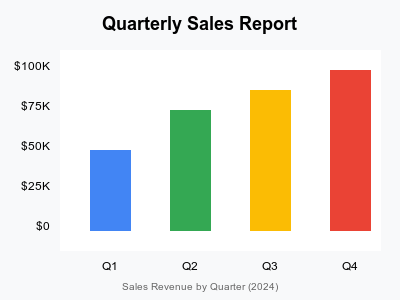
Extract chart data with a predefined schema chart_schema:
prompt = DataExtractionAgent.with(
  output_schema: :chart_schema,
  image_path: sales_chart_path
).parse_content{
"format": {
"type": "json_schema",
"name": "chart_schema",
"schema": {
"type": "object",
"properties": {
"title": {
"type": "string",
"description": "The title of the chart."
},
"data_points": {
"type": "array",
"items": {
"$ref": "#/$defs/data_point"
}
}
},
"required": ["title", "data_points"],
"additionalProperties": false,
"$defs": {
"data_point": {
"type": "object",
"properties": {
"label": {
"type": "string",
"description": "The label for the data point."
},
"value": {
"type": "number",
"description": "The value of the data point."
}
},
"required": ["label", "value"],
"additionalProperties": false
}
}
}
}
}Response
response = prompt.generate_nowGeneration Response Example
Parse Resume with output resume schema
Extract information from PDF resumes:
prompt = DataExtractionAgent.with(
  output_schema: :resume_schema,
  file_path: sample_resume_path
).parse_content{
"format": {
"type": "json_schema",
"name": "resume_schema",
"schema": {
"type": "object",
"properties": {
"name": {
"type": "string",
"description": "The full name of the individual."
},
"email": {
"type": "string",
"format": "email",
"description": "The email address of the individual."
},
"phone": {
"type": "string",
"description": "The phone number of the individual."
},
"education": {
"type": "array",
"items": {
"$ref": "#/$defs/education"
}
},
"experience": {
"type": "array",
"items": {
"$ref": "#/$defs/experience"
}
}
},
"required": ["name", "email", "phone", "education", "experience"],
"additionalProperties": false,
"$defs": {
"education": {
"type": "object",
"properties": {
"degree": {
"type": "string",
"description": "The degree obtained."
},
"institution": {
"type": "string",
"description": "The institution where the degree was obtained."
},
"year": {
"type": "integer",
"description": "The year of graduation."
}
},
"required": ["degree", "institution", "year"],
"additionalProperties": false
},
"experience": {
"type": "object",
"properties": {
"job_title": {
"type": "string",
"description": "The job title held."
},
"company": {
"type": "string",
"description": "The company where the individual worked."
},
"duration": {
"type": "string",
"description": "The duration of employment."
}
},
"required": ["job_title", "company", "duration"],
"additionalProperties": false
}
}
},
"strict": true
}
}Parse Resume with Structured Output
 Extract resume data with a predefined
 resume_schema:
response = prompt.generate_nowGeneration Response Example
Advanced Examples
Receipt Data Extraction with OpenRouter
For extracting data from receipts and invoices, you can use OpenRouter's multimodal capabilities combined with structured output. OpenRouter provides access to models that support both vision and structured output, making it ideal for document processing tasks.
See the OpenRouter Receipt Extraction example for a complete implementation that extracts:
- Merchant information (name, address)
- Line items with prices
- Tax and total amounts
- Currency details
Using Different Providers
The Data Extraction Agent can work with any generation provider that supports the required capabilities:
- For text extraction: Any provider (OpenAI, Anthropic, Ollama, etc.)
- For image analysis: Providers with vision models (OpenAI GPT-4o, Anthropic Claude 3, etc.)
- For structured output: OpenAI models or OpenRouter with compatible models
- For PDF processing: OpenRouter with PDF plugins or models with native PDF support
Provider Selection
Choose your provider based on your specific needs:
- OpenAI: Best for structured output with GPT-4o/GPT-4o-mini
- OpenRouter: Access to 200+ models with fallback support
- Anthropic: Strong reasoning capabilities with Claude models
- Ollama: Local model deployment for privacy-sensitive data
Learn more about configuring providers in the Generation Provider Overview.